
From Alert to Result: How Entendo Closes the Decision Loop on ERP Data
The alert with an owner, a deadline and money at stake, the why broken into pieces that add up, the what-if, the decision in three fields, and the verdict on the deadline. What Entendo Decisions does on the ERP database, and what it leaves to people.
Luciano de Oliveira
Founder & CEO, Sozo Data
The average mid-sized company measures the indicator every month and almost never measures the decision it tried to move it with. Entendo Decisions closes that gap on the ERP database: it warns whoever has to decide, shows why the number moved, simulates the options, records the decision in three fields, and checks the result when the deadline arrives. It's the cycle from the first two pieces in this series, built into Entendo.
The first piece was about the company that watches the dashboard and never records the decision. The second showed how to start measuring with a decision journal in a spreadsheet. This one covers how Entendo does the same thing on ERP data.
Entendo started out answering questions
You ask the database behind your ERP a question in plain language and get back a number, a table, or a chart, with the query that produced it in plain view so you can check it. That's conversational BI on the ERP, and querying the database in natural language is still the foundation.
Decisions follows the same rule: you should be able to check the work. Code evaluates the rules and computes every number. The language model writes the text that explains the result and turns a sentence into a rule, and its text is thrown out if it contains a number the code didn't compute. No number in an alert comes from the language model.
Thirteen decisions ship in the pack
The distribution pack covers 13 decisions. Four of them are the ones from the first piece: a cost increase that never reaches the price, credit that came back as a late payment, a purchase that blows the cash budget, and a large customer who keeps buying a little less each month. Others include stockouts, projected cash, sales-target pace, stuck orders, idle stock, phantom stock, unloading damage, and customers who stopped buying.
Campaign discounts, the fifth decision from the first piece, aren't among the 13. You can track them with a rule you create yourself, as described in the section on rules below.
Some of these decisions cross departments. A purchase that makes sense for inventory shows up in cash a month later, and a customer who is slipping away shows up in sales first and in receivables later. Three decisions in the pack join the two ends (stockout and replenishment, cash and purchasing, customer slipping away), because the data from both departments sits in the same ERP. Each one switches on only when an active pack rule exists for it.
The alert arrives with an owner, a deadline, and money at stake
When a rule fires, Entendo notifies the right person. The alert says what happened, who owns the decision, by when it has to be made, and how much is at stake, written as a decision to take. Only what calls for action becomes an alert. A swing that needs nothing stays on the dashboard.
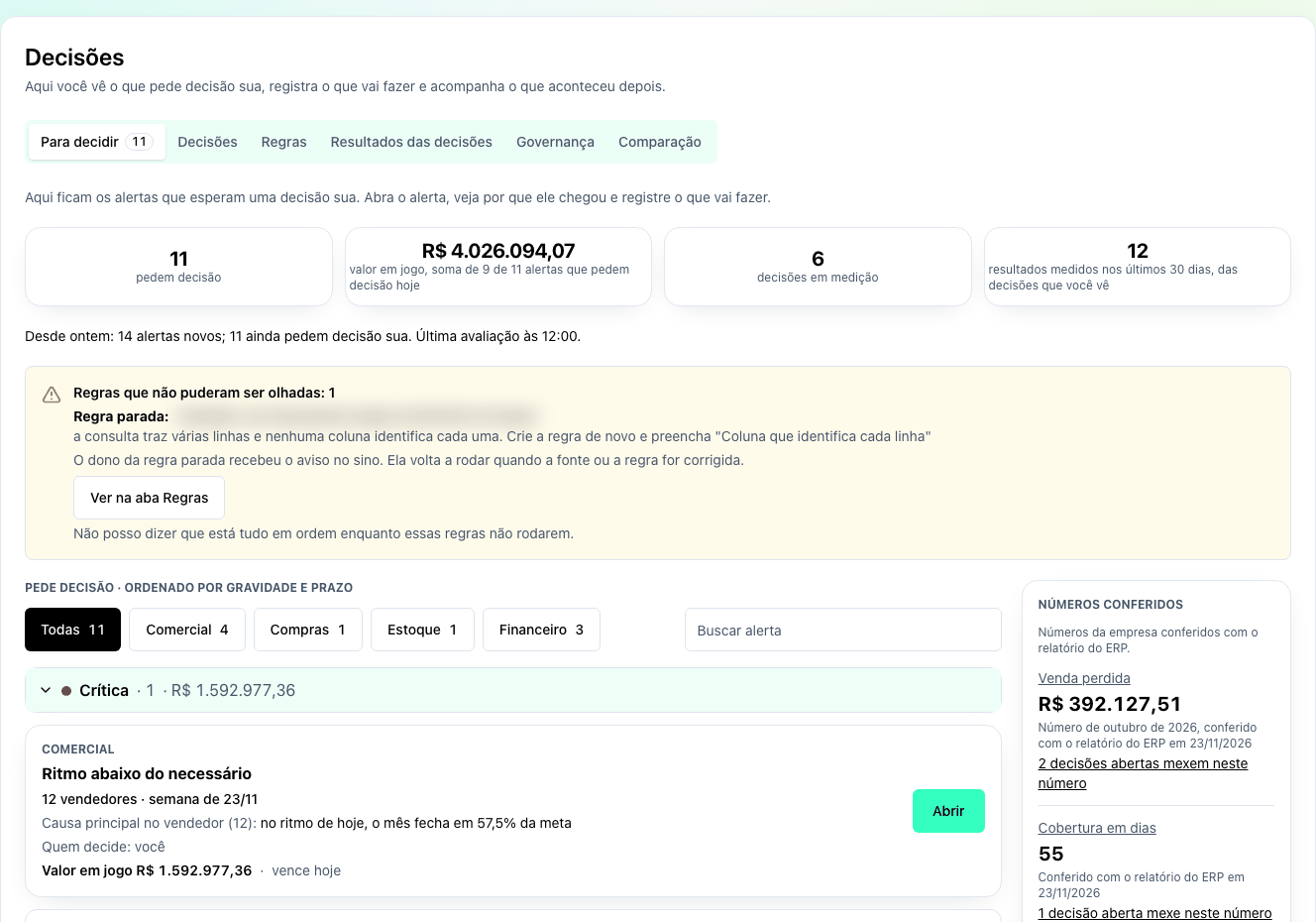
When nothing is unusual, the screen says when the check ran, for example "Nothing unusual: 7 of your rules evaluated at 06:10." If the check couldn't read the database, the screen says it didn't run instead of reporting that all is well. You can verify the silence, too.
The alert arrives in the Entendo notification bell and by email. Where WhatsApp is enabled, it also arrives in the chat, with three buttons: See why, which answers right there; Mute for 7 days, which pauses that rule on WhatsApp while the bell and email keep working; and Open in Entendo, which goes to the full breakdown. Each person activates their own number with a confirmation code and can reply STOP at any time. By default that's up to three messages a day outside the bell: anything beyond that stays in the bell, or in the daily digest for people who turned it on, and an urgent alert goes past the cap. The company can switch on the no-amounts mode, which removes money amounts from email and WhatsApp.
Why the number moved
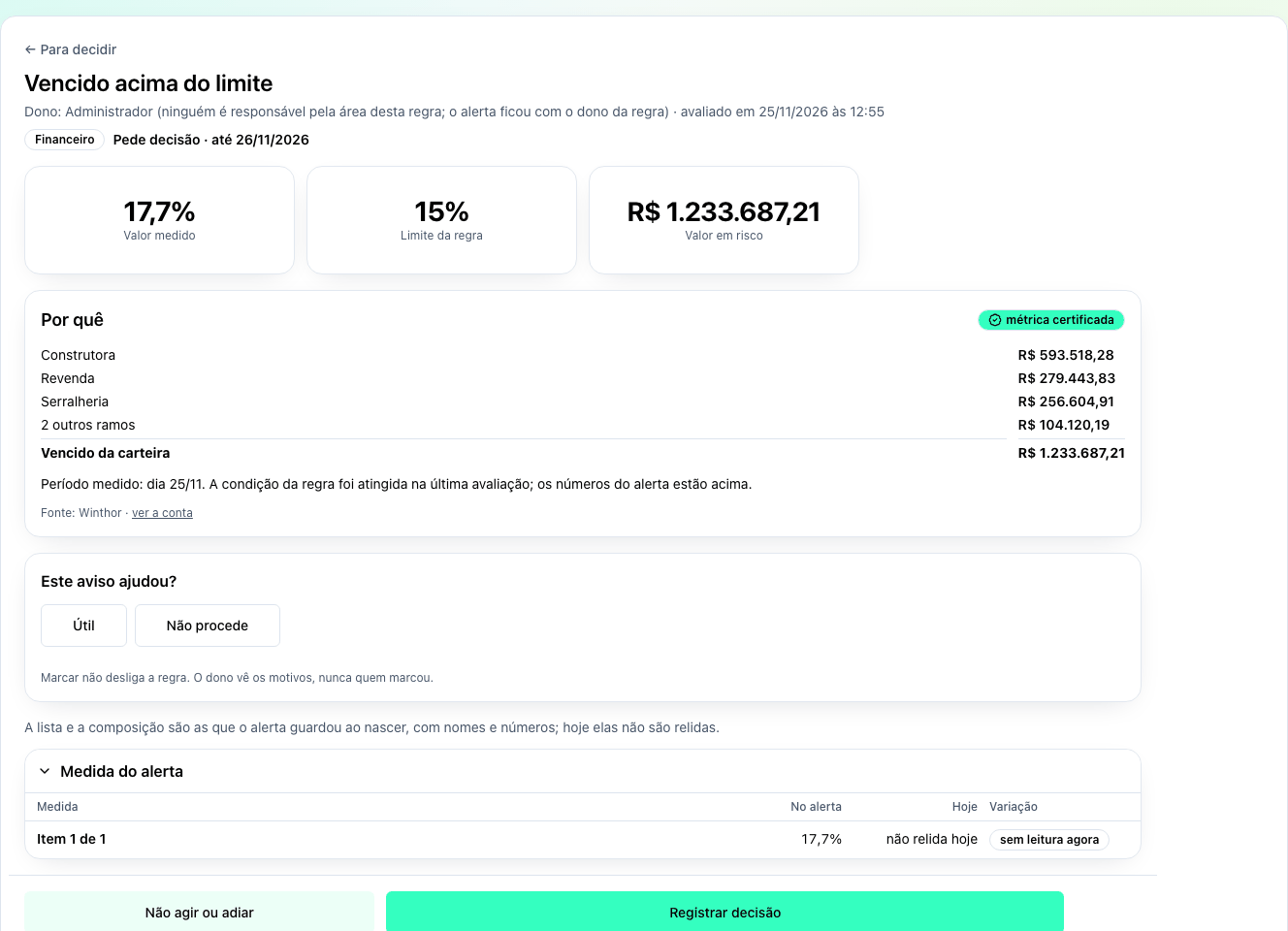
Knowing that margin fell helps very little. Entendo shows which parts of the data the change is concentrated in and how much each part weighs, in pieces that add up exactly to the total. They're slices of the data, not proven causes. Margin, stockouts, and slices of sales each have their own breakdown. The See the math button opens the source, period, filters, and formula behind the result and, for people with chat access to that source, the query, so it can be reproduced in your own database.
Simulating the options before deciding
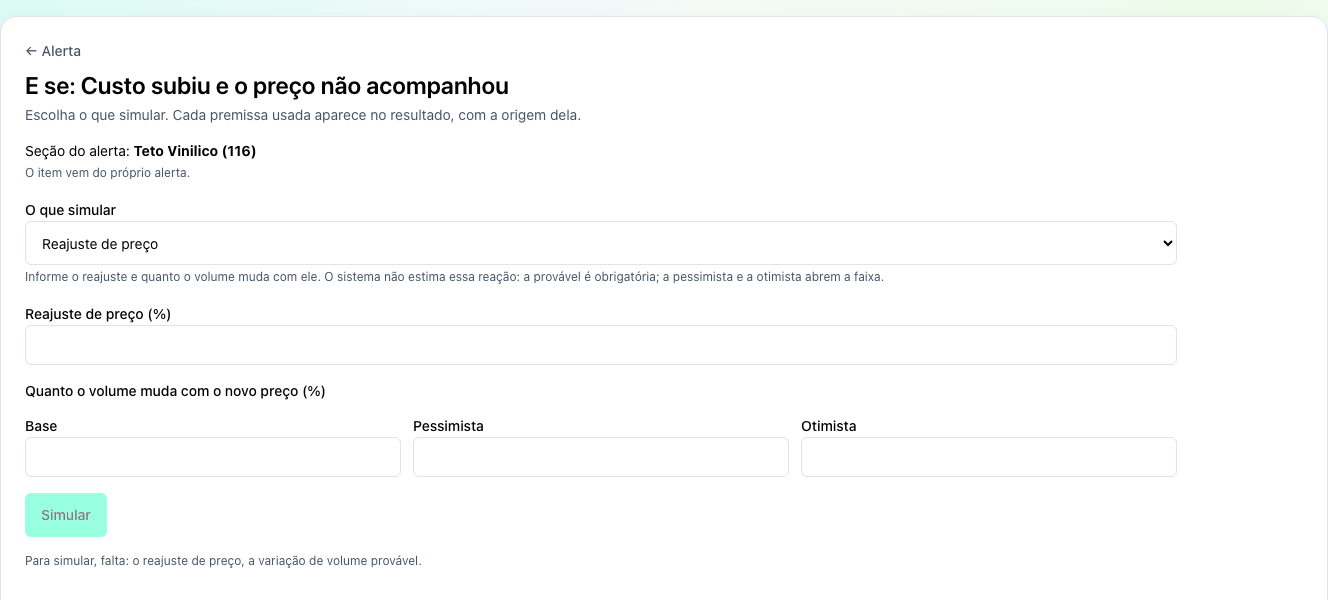
Before deciding, you see what happens under each option: pass the full increase on, pass half, hold the price. The assumptions stay open on screen, each with its source: it came from the pack, the decision-maker entered it, or it was measured from the data. For cash and purchasing decisions, the screen also compares the options side by side and says which ones keep the minimum balance and which can't solve it alone.
The result comes as a range, with pessimistic, likely, and optimistic scenarios, when there's enough data or when the person supplies the extremes. Without that, the screen shows only the base case and says why, for example that too few customers have a measured payment delay to support a range. A range made up for the occasion would convey a certainty the forecast doesn't have.
Recording the decision takes three fields
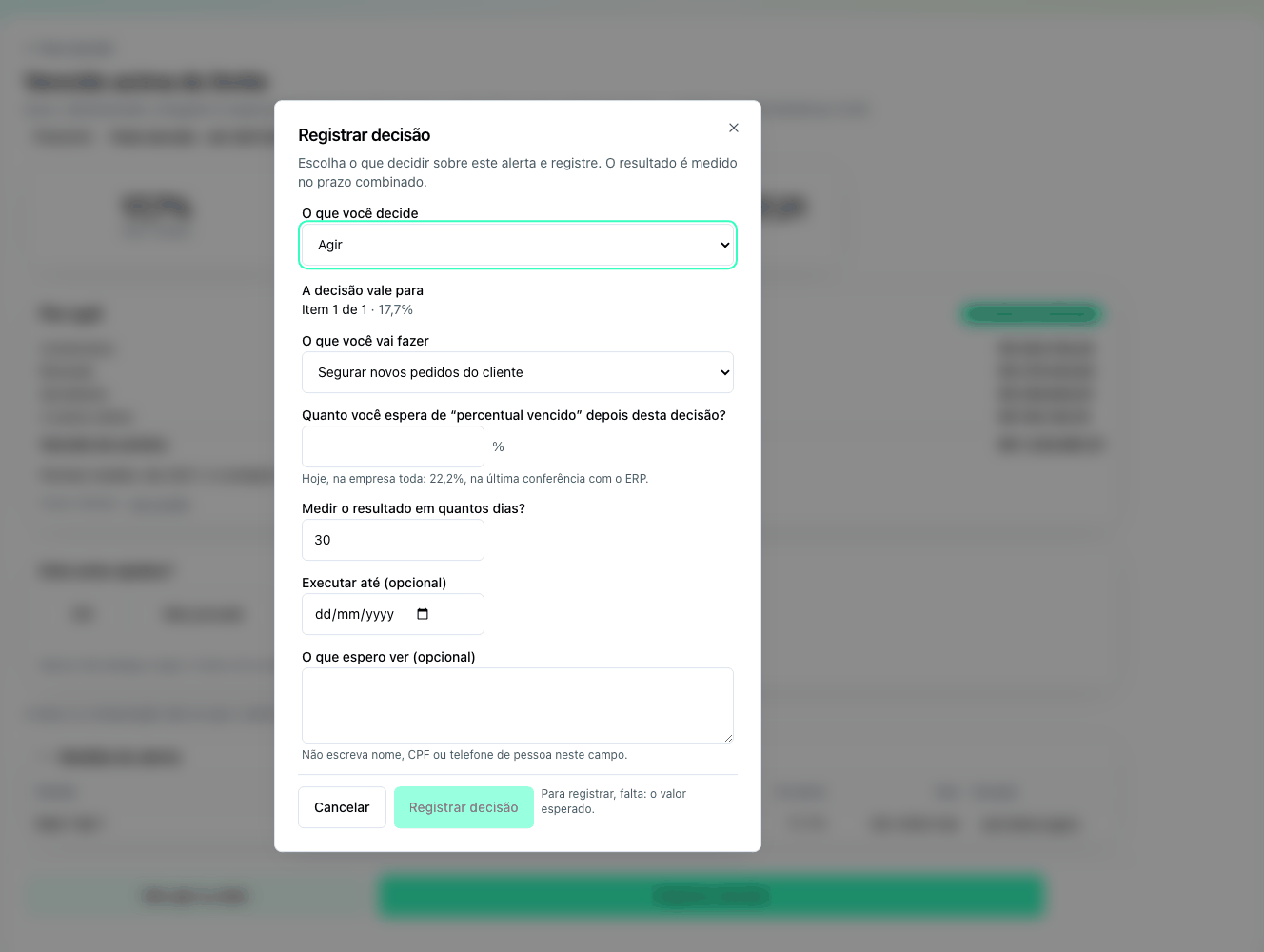
Recording a decision takes three fields: what will be done, what you expect to see, and by when. The assumptions of the moment are saved alongside, as they stood that day. "Do nothing" and "postpone" count as decisions too and can be recorded.
The expectation is written down before the result, not after.
It's the decision journal from the second piece, filled in at the same place the alert arrived. That habit is what protects against the hindsight and outcome biases from the first piece.
What happened afterward
When the deadline passes, Entendo measures the metric and gives a verdict: within expected, outside expected, or inconclusive. Confirming that the action was actually carried out is up to whoever decided.
"Inconclusive" appears when the data source was unavailable, when there's no evidence the action was carried out, or when an assumption changed by more than was accepted. In those cases Entendo doesn't credit the result to the decision. "Do nothing" is measured without crediting anything to an action, and "postpone" isn't measured at all, because no decision has been made yet.
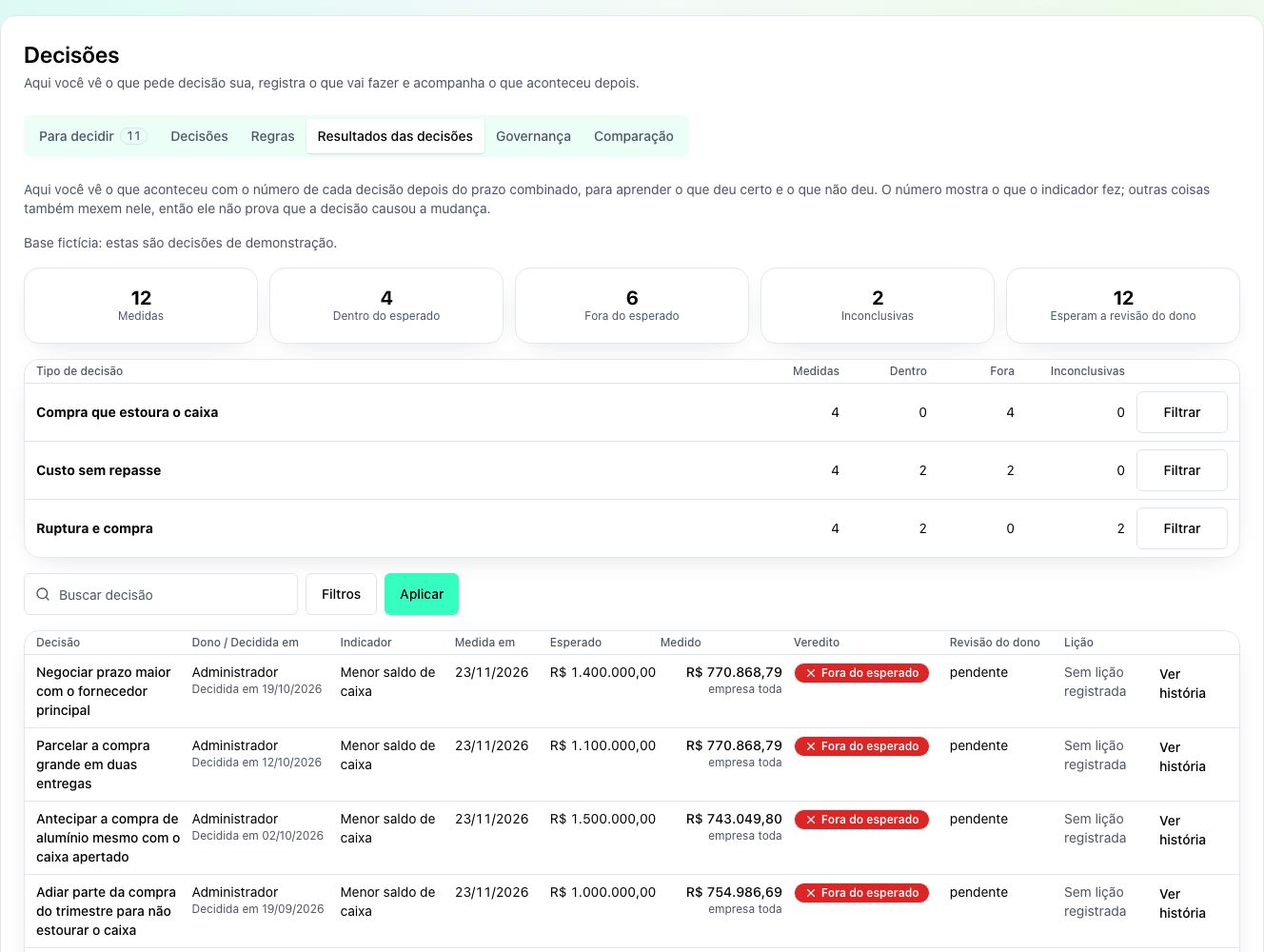
Over time the decisions and verdicts add up to a record of what worked. The Decision outcomes tab groups that record by type of decision and shows a pattern only once there are at least three already-measured decisions of the same type. With fewer, the screen says there isn't enough history yet.
Governance: whoever runs the cycle sees where it stops
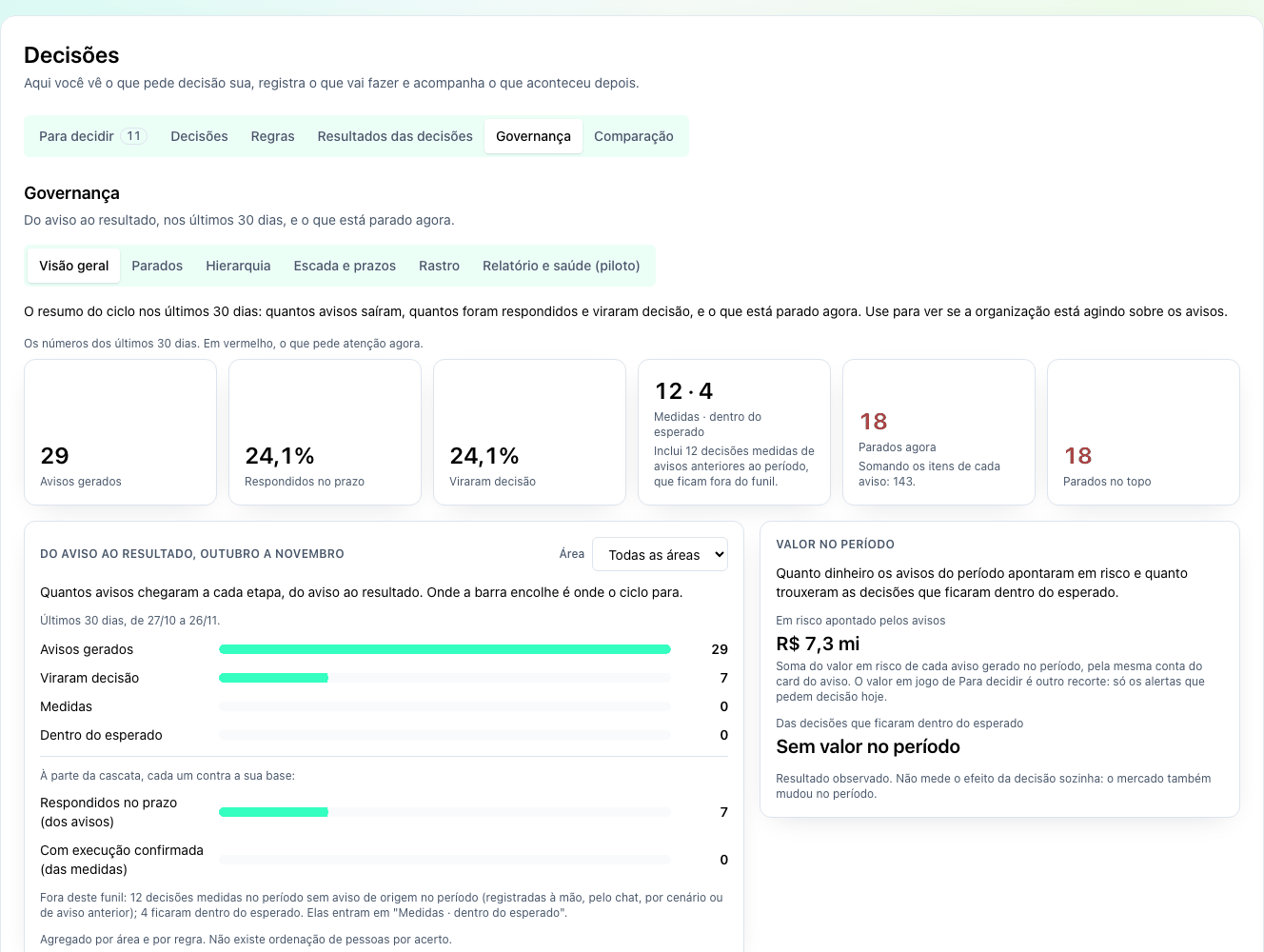
An alert nobody answers never becomes a decision, and the dashboard doesn't show that. The Governance tab shows the whole cycle over the last 30 days: how many alerts went out, how many were answered on time, how many became decisions, how many were measured, and how many came in within expected. The funnel shows where the cycle stops: where the bar shrinks, the alert stopped moving. The screen also adds up the amount at risk that the alerts pointed to in the period.
What's stalled shows up in a list, from the most urgent to the oldest. Whoever runs the cycle can ask the person holding the item to respond, who gets the request in the bell, or mark the alert as answered. The text says "stalled since" and never points a finger, and the numbers are aggregated by area and by rule, with no ranking of people by hit rate.
An unanswered alert climbs the company's reporting chain, and the deadlines for each step can be adjusted by the organization, by area, or by rule. The org chart keeps every change as a dated version, so an old decision shows the chain that applied on its date. The hierarchy can come from a spreadsheet or from suggestions read from the ERP, and nothing enters the tree until someone confirms it. Whoever will be away sets a substitute for a period, and when someone is deactivated, their items go to their manager: nothing is left without an owner.
All of it lands in the trail, the record of who was warned, who decided, and what climbed the ladder. Trail events can't be edited or deleted. Correcting a decision creates a new version with the reason, and when someone requests erasure under Brazil's LGPD, the person is swapped for a pseudonym but the event stays. Whoever runs the cycle can answer who knew, when, and what they did.
Who sees what, and what gets stored
Decisions live in the Decisions area, in tabs: To decide, Decisions, Rules, Decision outcomes, Governance, and Comparison. Governance opens for anyone with the view-governance permission, for their team or the whole organization; the administrator sees everything. People with the alerts-only profile see just the alerts addressed to that profile and the decisions they recorded.
Entendo stores the number and the rule, without the ERP rows. The customer or product involved is kept as a pseudonym. The list of items is read again from the company's database when someone opens the alert, and the screen shows the value on the day of the alert next to today's.
Rules that users create
Rules don't depend on IT. Some come ready-made in the pack, and the user adjusts the threshold and the recipient. Others are created from a dashboard widget or from a chat answer, and in accounts where creating a rule from a sentence is enabled, the user can write something like "tell me when coverage on any class A item falls below the delivery lead time." The sentence goes through the language model once, to become a query, and from then on the rule runs without it.
Before a rule goes live, it goes through the test from the second piece. The preview shows how many alerts it would have produced over the last 90 days. If the query looks only at today's state, such as open receivables, Entendo says the past can't be estimated and shows how many times the rule would fire right now.
A rule that doesn't come from a certified metric carries an uncertified badge and the creator's name. Pack metrics earn the certified badge when they match the company's official figure, with the formula in business language, who certified it, and when. If the formula changes, the badge is suspended. And nobody receives in an alert data they couldn't see in Entendo itself: sending to someone without access to the query's rows is blocked.
What Entendo does and what it leaves to people
Gartner describes three modes of decision intelligence: support, augmentation, and automation. Entendo does support and augmentation. It warns, explains, simulates, and measures, and the person decides. No path in the module writes to the ERP. Entendo issues read-only queries, and the recommendation at setup is to create a read-only database user for it.
During setup, Entendo checks the company's own data to see which decisions will work there and which need something that's missing, with one answer per decision: works, works with a caveat, works but not yet checked, or doesn't work. That happens before any alert is switched on.
The catalog's decisions rest on the usual indicators, such as contribution margin, delinquency and days sales outstanding, inventory turnover, and ABC curve of customers. An Entendo alert points at the same target vs. actual figures that the monthly results meeting already reviews, with one difference: the decision leaves the meeting on record. For how these decisions are laid out by level, see strategic, tactical, and operational decisions.
To see the cycle running on your company's data: www.sozodata.com.br/en-US/contato.
Sources
- Gartner. Data & Analytics Summit London 2025: Day 3 Highlights, May 14, 2025.
New articles straight to your inbox.
No spam. Only content on data, BI and business decisions — when we publish.
Ready to stop waiting for the number?
Entendo answers questions about your data in plain language, warns you before month-end and records the decision. No SQL, no ticket, no waiting on an analyst.